Knowledge Base Article
How the Constituent Score Works
Argenta scores every active constituent from 0 to 100 on how involved they are with your organization right now. The score is recalculated every night, so it reflects what people have actually been doing rather than what they did when someone last ran a report.
This is the score you see on the Score tab of a constituent record and in the Engagement column on the constituent list. It is a separate thing from the Constituent Engagement Score Report, which has its own six-part calculation and its own article.

The score, its band, and when it was last worked out.
Where to find it
- One person: open their constituent record and click the Score tab.
- Everybody: the constituent list shows a colored score pill on each row. You can sort by Constituent Score and filter by band.
- Settings: Settings, the gear at the top right, then Subscription Settings and Constituent Scoring.
You need to be a Constituent Manager or an administrator to see any of it. If scoring has been switched off for your team, the Score tab says so and the list hides the score column.

One person: the Score tab on their record (1).
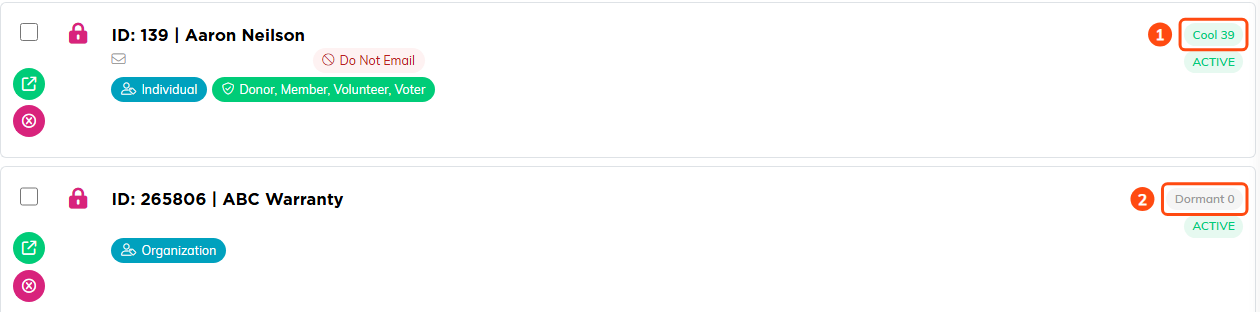
Everybody: a colored pill on each row of the constituent list, here Cool 39 (1) and Dormant 0 (2).

Settings: Subscription Settings, then Constituent Scoring (1).
The four parts of the score
The total is built from four separate measures, each scored 0 to 100 and then weighted. The Score tab shows all four, so a number is never just a number you have to trust.
- Breadth is how many different kinds of activity someone has. A person who volunteers and comes to events and gives scores higher here than a person who only gives, even if they give more. Six or more different kinds counts as fully broad.
- Depth is standing commitments: has given before, is an active volunteer, is an active member, is signed up for a trip. Each one is worth a quarter of this measure.
- Engagement is how much they have done lately. Recent activity counts for more and older activity fades out, so a burst of involvement last month outweighs the same burst five months ago.
- Momentum is simply how recently they last did anything at all. Someone who turned up last week scores high here even if they have done little else.

All four parts are shown with what each one counts and how much of the total it carries.
The six month window
Breadth and Engagement only look at the last 180 days. Older activity still appears on the record so you can see the history, but it no longer adds points. This is deliberate: the score answers "how involved is this person now", and a big gift in 2019 does not answer that question.
Depth is the exception. Having given before counts whether it was last month or ten years ago, because a past donor is a different prospect from someone who has never given.
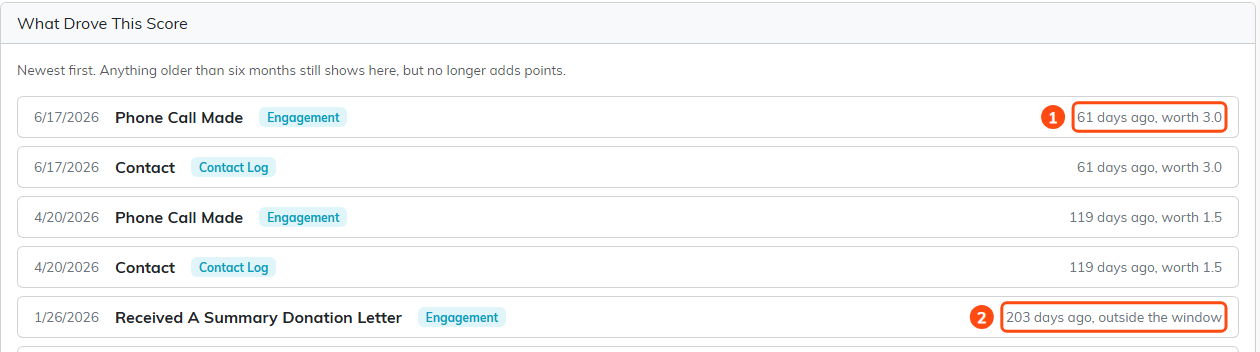
Recent activity still carries points (1). Older activity stays on the record but is labeled outside the window (2).
Hot, Warm, Cool and Dormant
Every score falls into a band, which is what the colored pill shows:
- Hot from 70 up
- Warm from 40 up
- Cool from 15 up
- Dormant below 15
Those are the starting numbers. An administrator can move them, so your bands may differ.

Where each band starts, and the Going Quiet day count, both editable.
The two quick views
At the top of the constituent list there are two buttons that answer the questions most organizations are actually asking.
- Ready To Ask is everyone engaged enough to approach who has never given you anything. These are the people already showing up who have never been asked.
- Going Quiet is everyone who used to take part and has done nothing for a while. The default is 180 days and an administrator can change it.
Show Everyone clears whichever view you picked.

The two quick views sit in the filter, with the Engagement band filter beside them.
What drove this score
Under the score on the Score tab is a list of the activity behind the number, newest first. Each line shows the date, what it was, where it came from, how many days ago it happened, and how many points it is worth today. Anything outside the window is labeled as such, so you can see both what counted and what stopped counting.
If someone has never been scored, the tab says so and offers a Recalculate Now button rather than showing a misleading zero.

Each line carries the date, what it was, where it came from, how long ago, and what it is worth today.
Changing the weights
Under Subscription Settings and Constituent Scoring, an administrator can set how much each of the four parts counts. The four weights have to add up to 100. Argenta starts you at Breadth 25, Depth 25, Engagement 30 and Momentum 20.
Change these if your work does not match the starting assumption. A volunteer-led organization might raise Breadth and Depth; a group running an appeal might raise Momentum to surface whoever is warm this week. The same screen holds the band numbers and the Going Quiet day count.
After changing anything, click Save Settings, then Recalculate All Scores Now if you do not want to wait for the overnight run.

The four weights, which have to add up to 100.
Exporting the scores
The constituent list export includes Constituent Score and Constituent Score Band columns. Anyone who has not been scored comes out blank rather than as a zero, so a blank cell and a genuine zero are not confused with each other in your spreadsheet.

Export to CSV, above the list.
