Knowledge Base Article
Validating An Email Address
Argenta allows you to build templates and send out emails to your constituents through lists, Events and Campaigns. We send those emails using The Amazon Web Services Email Relay, one of the most trusted ways of sending emails. This means more emails will be successfully delivered. Sending emails through AWS requires Email Validation. If you would like the emails you send to come from your own email address, you must allow AWS to verify it.
To validate an email address:
- Choose "Settings" in the top right menu.
- Choose "Email Settings".
- On the "Email Address Verification" tab, enter your email address in the "Email Address To Validate" field.
- Click the "Validate" button.
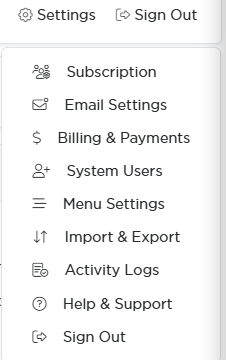
Settings in the top right, then Email Settings.
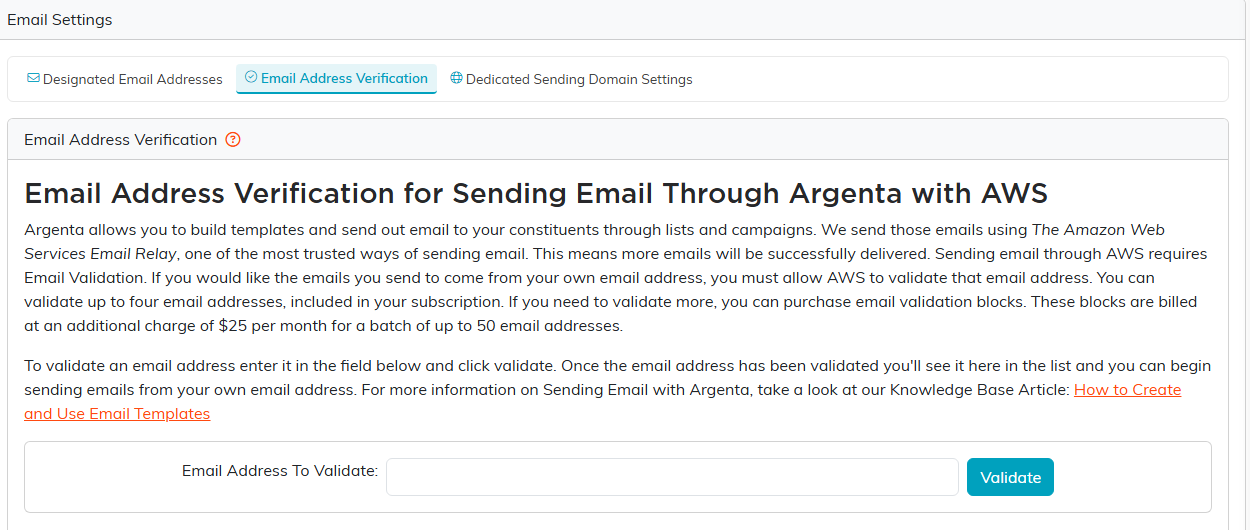
The Email Address Verification tab. Verified addresses land in the list below.
An email will been sent from "Amazon Web Services" to the email address you entered. When you receive the email, click the link in the email body to verify your email. Once you complete that step, the validated email address will be displayed in the "Verified Email Addresses" list. When building your email batches you can use any validated email in the "From" field.
For more information on Sending Emails with Argenta, take a look at our Knowledge Base Article: Working with Email Templates.
