Knowledge Base Article
Add Volunteers
A Volunteer is any individual, organization, or household who supports your organization by volunteering. In Argenta, volunteers are first created as constituents and then designated as volunteers.
To get started, choose either Constituents (CRM) or Volunteerism > Volunteers from the Argenta main menu on the left-hand side of the screen. This opens your full list of Volunteers.

The Volunteers list, with Add New below the filter.
From the Volunteers list, click the Add New button. This opens the Add A New Volunteer page, where you designate a constituent as a volunteer.
Start typing the constituent's name in the search box and select the correct person, organization, or household from the results. If the constituent does not yet exist in Argenta, click the add icon next to the search box to create a new constituent without leaving this page.
Once you have selected the constituent, click the Add Volunteer & Enter Details button.
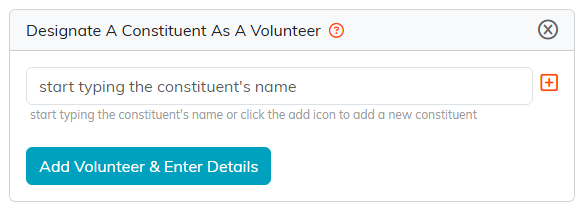
Type the name, or use the orange plus to create a constituent without leaving the page.
Argenta creates the volunteer record and takes you to the new volunteer's workspace. From there you can fill in the rest of the volunteer's details, such as the active date, whether they act as a team member, whether they are a student volunteer, their department or chapter, volunteer category, acquisition source, any associated campaign, notes, and more.

The new volunteer's workspace.

Active Date is required. Beside it is whether they act as a team member.

Volunteer Status, Volunteer Category, and whether they are a student volunteer.

Chapter, Division and Department.

Acquisition Source and Associated Campaign.
