Knowledge Base Article
Where to find the Program List
The Program List is your central hub for viewing and managing all programs in Argenta.
Navigation Path
From the main menu, navigate to: Programs > Program List
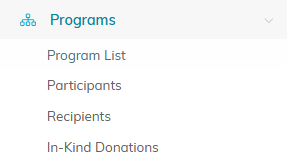
Programs in the left menu, then Program List.
What You Will Find
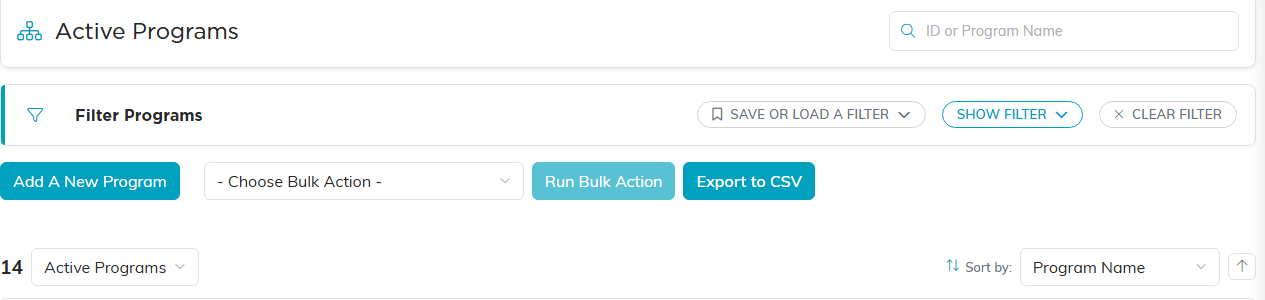
- Search: Find a program by ID or name using the search box at the top right
- View: Switch between Active Programs and All Programs
- Filter: Open the Filter Programs panel to narrow results by status, type, category, chapter, division, department, assigned team member, funding, and date range
- Save or Load a Filter: Save a filter you use often and reuse it later. You can keep it to yourself or share it with your organization
- Add: Create a program with the Add A New Program button
- Export: Download the list with the Export to CSV button (opens in Excel)
- Sort: Arrange the list by Program Name, Program ID, Start Date, or Budget
List Display
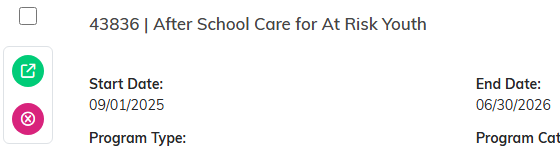
Each program row shows:
- Program ID and Program Name, with Status and Funding Status on the right
- Start Date, End Date, and Budget
- Program Type, Program Category, and Assigned To (Team Member)
- Chapter, Division, and Department when your organization uses them
- District and Precinct for political organizations

Quick Actions
- Click the green open arrow to the left of a row to open that program
- Click the pink X to delete a program. It is hidden if you have view only access
- A pink lock icon next to the program name means the record is locked
Working With Several Programs at Once
Select programs with the checkboxes and use Bulk Actions to apply a change to all of them at once. Select All reaches every program matching your current filter, not just the ones on screen.

