Knowledge Base Article
Where to find the Auction List
The Auction List is where you manage all of your organization's auctions.
How to get there
From the left sidebar, choose Fundraising > Auctions.
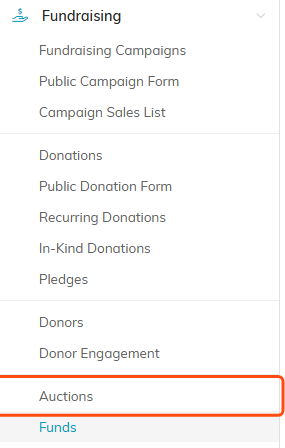
Auctions sits under Fundraising in the left sidebar.
What you can do here
- Search auctions by ID or title.
- Filter by status, type, category, or date range.
- Add A New Auction to create one.
- Export to CSV to download the list.

Search, filter, add and export all live at the top of the list.
What each row shows
Every auction lists its ID and title, status, start and end dates and times, type and category, and the assigned team member.

Each row carries the auction's ID and title, its status, and the key details.
Quick actions
- Click the green open icon to open the auction workspace.
- Click the copy icon to duplicate the auction (Copy & Add New).
- Click the pink delete icon to delete an auction.
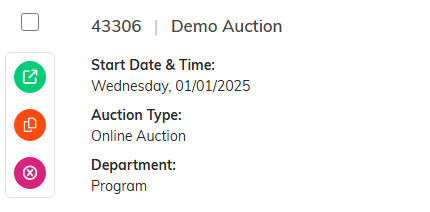
The three round icons on the left of a row open, copy or delete the auction.
