Knowledge Base Article
How to Suspend a Membership
Suspending a membership puts it on a temporary hold without ending it, so the member is expected to return.
When to suspend
Suspension fits a temporary hold: a member's request (illness, travel, hardship), a disciplinary pause, or a payment issue to resolve before reinstatement, when the member will likely come back.
Suspend a member
- Open the member record and go to Member Details, then find the Suspension section near the bottom.
- Set Is Suspended? to Yes.
- Enter a Suspension Start Date (required; it defaults to today) and, if known, a Suspension End Date.
- Choose a Suspension Reason.
- Click Save All Changes & Continue or Save All Changes & Exit.
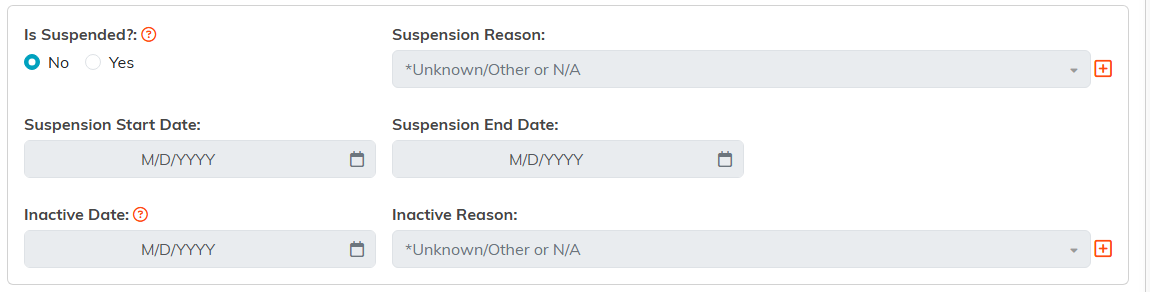
The suspension fields stay greyed out until Is Suspended is set to Yes.

Nothing is recorded until you save.
Suspended vs. Inactive
These are different states. Suspended is a temporary pause with the member expected to return. Inactive means the membership has ended because they did not renew or chose to leave, which you set with the Active Status field along with an Inactive Date and reason.

Active Status is the field that makes a membership Inactive, not the suspension switch.
End a suspension
- Open the member record and set Is Suspended? back to No.
- Update the term and renewal dates if the pause affected their membership period.
- Save.
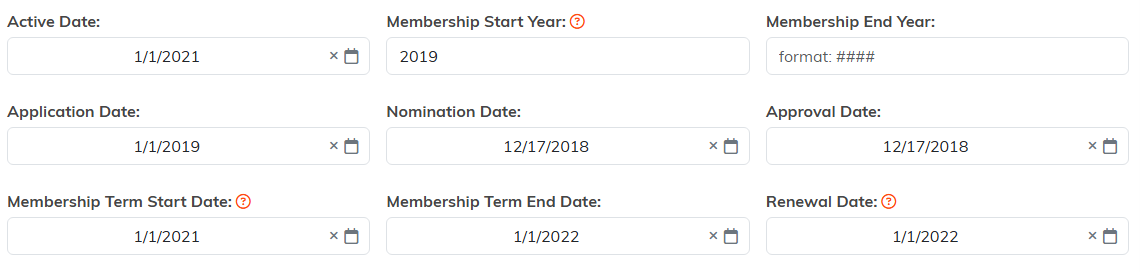
These are the dates to push out if the pause moved their membership period.
