Knowledge Base Article
How to Set Up and Track Recurring Donations
A recurring donation is a gift set to repeat on a schedule, so Argenta adds each future gift for you automatically.
Set up a recurring donation
You create a recurring donation from an existing donation, not from a blank form:
- Record a donation as usual (see Add Fiscal Donations), or open one you already have.
- On the Donation Details page, click Make Recurring.
- Choose how often it should recur, Monthly or Annually, and click Add Recurring Transaction.

Step 2: Make Recurring, on a donation you have already saved.
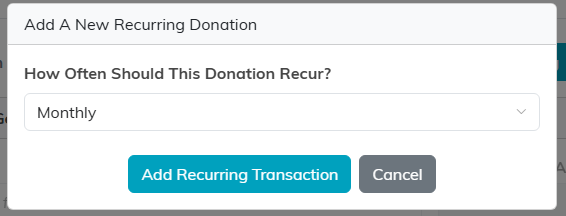
Step 3: pick Monthly or Annually, then Add Recurring Transaction.
From then on, Argenta automatically adds the next donation on schedule.
Track and manage recurring donations
Open Fundraising > Recurring Donations to see every recurring gift, each with its schedule (Monthly or Annually), last donation date, and next donation date. You can filter by donor, fund, campaign, payment method, frequency, and more, and Export to CSV for outreach or reporting.
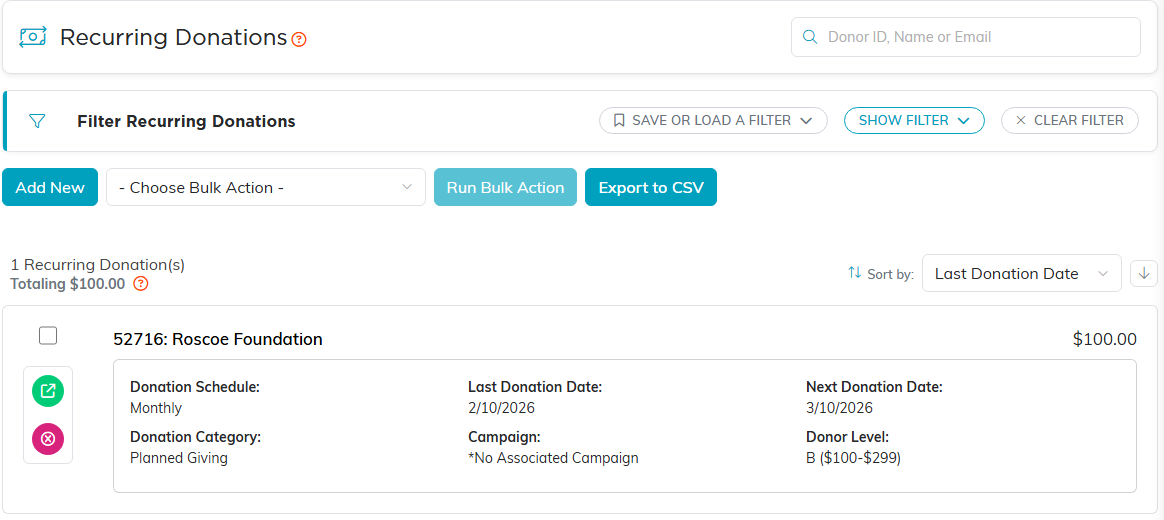
Every recurring gift, with its schedule and its next date.
To stop a recurring gift, click the pink delete icon on its row and confirm. This removes the auto-schedule only; the donations already recorded stay in place. (The Add New button on this list simply points you back to the Make Recurring step above.)

The pink delete icon stops the schedule. The gifts already recorded stay.
Keep an eye on your sustainers
Recurring donors are among your most valuable, so scan the Recurring Donations list for anything that needs a personal follow-up and reach out promptly.
