Knowledge Base Article
What is an Ambassador in the Membership module?
An Ambassador is the person who referred or recruited a member to your organization. Argenta tracks this on the member record so you can recognize who is bringing people in.
Set a member's ambassador
- Open the member record and go to Member Details.
- Find the Ambassador (Referred By) field.
- Start typing the referring person's name in the lookup and select them.
- Click Save All Changes & Continue or Save All Changes & Exit.
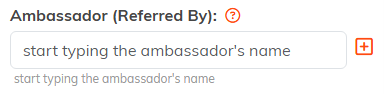
Start typing and Argenta finds the constituent for you.

Save the record and the referral is recorded.
Who can be an ambassador
An ambassador is an existing constituent, often a current member, donor, or volunteer, who introduced someone to your organization.

Ambassador sits on the top row of Member Details, beside the status fields.
Ambassador vs. Solicitor
They track different things. An ambassador refers new members to the membership program; a solicitor is the team member credited with bringing in a donation on the fundraising side. The same person can be both.
Why track it
- Give credit for who brings in new members.
- Spot your best recruiters to support referral or incentive programs.
- Say thank you when an ambassador's referral joins, with a note, a newsletter mention, or a small token of appreciation.
