Knowledge Base Article
How to Use Follow-Up Tasks to Track Action Items
A follow-up is a reminder attached to a record, so the thing you promised to do stays with the person you promised it to. Use one to call a donor after a major gift, send information somebody asked for, check in with a volunteer, or finish a pending action.
Add a follow-up
- Open the record and go to its Follow-Up page. You will find one on constituents of every type (donors, volunteers, members, recipients, board members) and on other records too.
- Click Add New.
- Fill in the follow-up:
- Team Member, whoever is responsible. It starts on you.
- Follow-Up Reason, what needs doing.
- Follow-Up Date & Time, when it should happen. This lands on your calendar.
- Click Save All & Continue to stay put, or Save All & Exit to save and go back. Cancel & Exit leaves without saving.
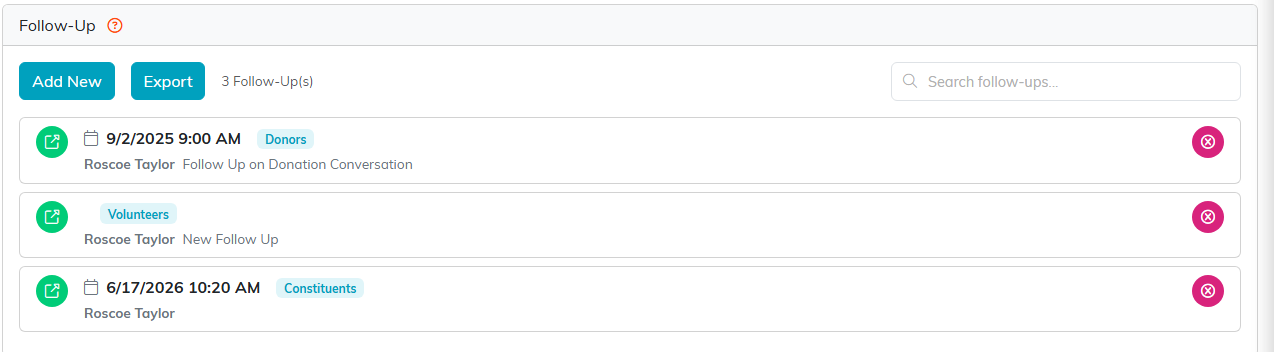
Add New starts a follow-up on the record you are looking at.
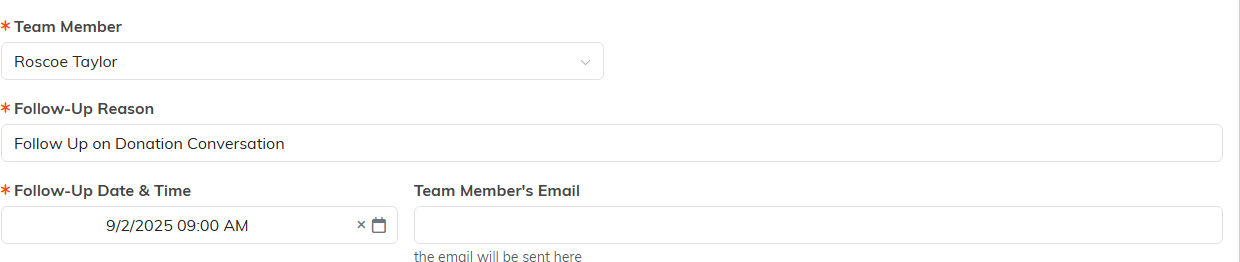
Three fields carry the orange asterisk.

Cancel & Exit leaves without saving.
Get reminded
Setting a date is not the same as being reminded. To get an email about it, set a Notification Date & Time as well, which is when Argenta sends the reminder. The message goes to the Team Member's Email shown on the form, and you can copy somebody else in with Send A Notification to 2nd Email Address.

The reminder only goes out if you set a notification date.
Close the loop
Once the follow-up has happened, come back and fill in Follow-Up Outcome with what came of it. That is what turns a list of reminders into a history somebody else on your team can pick up.

Come back and write what came of it.
Search your existing follow-ups on any record with the search box above the list.
