Knowledge Base Article
How to Track Recognition Awards and Honors
Recognitions let you track the awards and honors your organization records for a person, such as volunteer service milestones, donor recognition levels, and years-of-service awards.
Add a recognition to a person
- Open the constituent record and go to the Recognitions tab.
- Under Recognition, pick the award from the drop-down and set the Date.
- Click Add. The recognition appears in the person's Recognitions & Awards list, where you can remove it later.

Recognitions and Awards on a record. Pick one, set the date, Add.
The Awards & Recognitions list
You can also work from the full list at Constituents (CRM) > Awards & Recognitions. Use Add New to create a recognition, filter by Category, search by ID or title, and Export to CSV. Each recognition is tied to the constituent who received it.
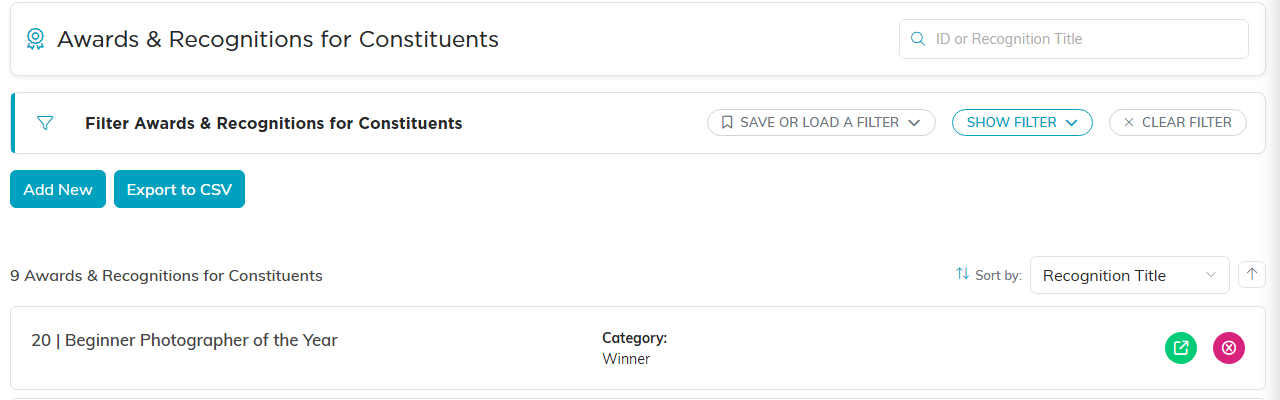
The Awards and Recognitions list, where the awards themselves are kept.
The recognition list
The recognitions in the drop-down are your organization's list of awards and honors. An admin maintains that list, so if the one you need is not there it can be added.
