Knowledge Base Article
How to Filter by Activity Type in the Engagement Report
Filter by Activity Type narrows the Constituent Engagement Score Report to people who have a particular kind of activity on record. It sits with the other filters at the top of the report and starts on All Activity Types.
How it works
- Open the list and select one or more activity types. The button shows how many you have picked.
- Selecting several narrows further, it does not widen. Someone has to have all of the types you picked to appear.
- Selecting none applies no activity filter at all, so you get everyone with an engagement score above zero.
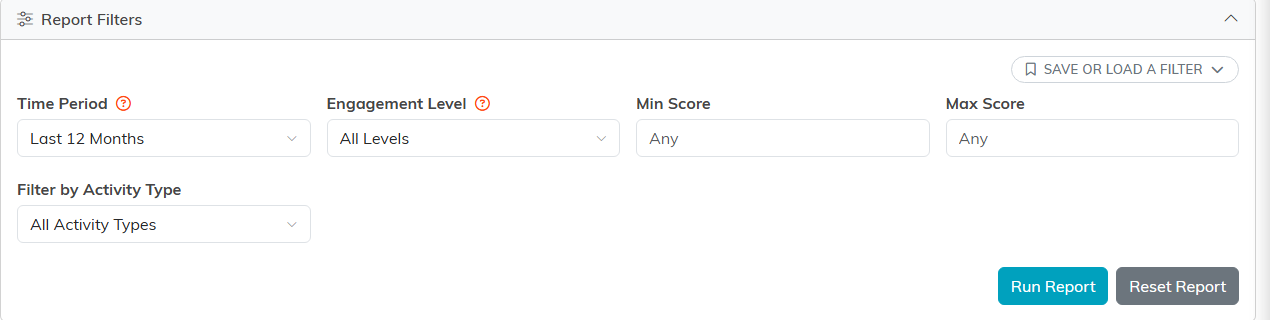
The filters: time period, level, a score range, and activity type.
What each one means
- Volunteer: has volunteer hours logged, or is flagged as an active volunteer.
- Event: attended at least one event. Being invited without attending does not count.
- Email: opened or clicked at least one email. Merely being sent email does not count.
- Membership: is an active member, or has recorded visits.
- Giving: made at least one donation.
- Leadership: holds a board position or a committee role.
All of these are judged inside your chosen Time Period, so a volunteer whose hours were all logged three years ago will not show volunteer activity on a twelve month view.
The one real limitation
These filters can only include, never exclude. There is no way to ask for people who have not done something. So to find, say, volunteers who have never given, select Volunteer, run the report, and then look down the results for the people whose Donor icon is off and whose G badge is zero. Leaving Giving unselected does not filter donors out, it simply does not filter on giving at all. That distinction trips people up more than anything else in this report.
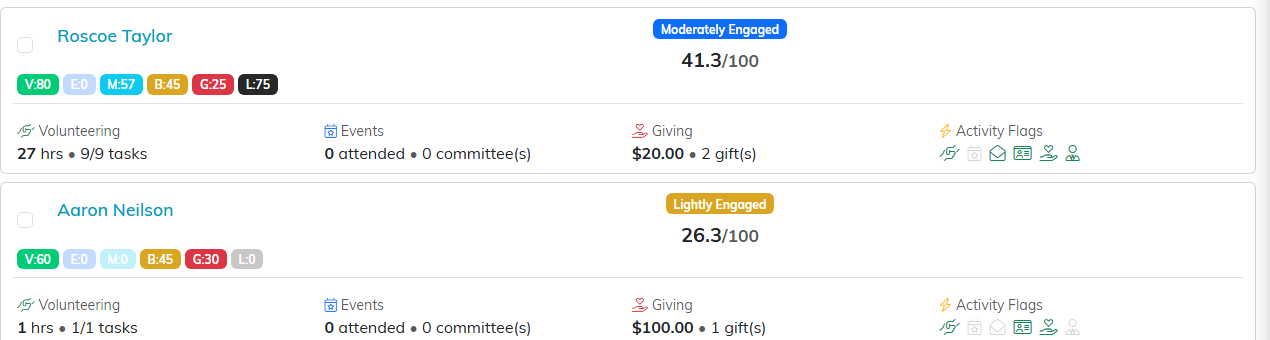
Each row shows the six dimension chips, the band, and the score out of 100.
Combinations worth trying
- Volunteer + Giving for supporters who give both time and money, often your best board prospects.
- Event + Giving for the people who turn up and give, worth a personal invitation to the next thing.
- Volunteer + Event + Giving for the small group involved in everything.
- Leadership on its own to see who currently holds a board or committee role.
Every type you add shrinks the list, so start with one or two and build up.
For a worked example, see How to find volunteers who could become donors using the Engagement Report.
