Knowledge Base Article
What is the Email Template Workspace?
The Email Template Workspace is the place in Argenta where you design, edit, and send email templates. It combines a full HTML editor with email sending controls in one workspace.

The workspace controls: save, and the two ways to send.
What you can do in the Email Template Workspace:
- Design your email using the rich HTML editor with formatting tools, images, documents, tables, buttons, and more
- Insert merge tags for personalization by clicking the tags icon in the editor toolbar
- Set the From email address and Subject line, including merge tags in the subject
- Send to a single recipient by searching for a constituent
- Send to a mail room list for batch email campaigns with scheduled delivery
- CC team members so internal staff receive a copy of the email
- Save, copy, or delete the template

The editor toolbar, with the Tags button for merge tags.
How to access it:
- Navigate to the Communication from the main menu
- Click Email Templates
- Click on any existing template to open it, or add a new template first
- Click the Template Design tab to enter the Email Template Workspace
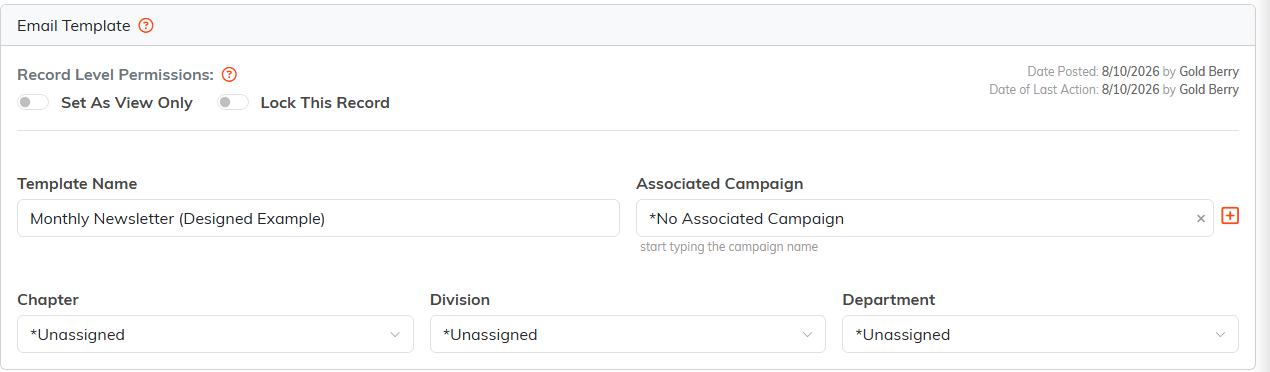
The Template Details tab. District and Precinct also appear on political teams.
The Email Template Workspace also has a companion Template Details page where you can set the template's associated campaign, organizational hierarchy assignments (chapter, division, department, district, precinct), and record-level permissions like View Only and Lock.
